SLINGWRIGHT
Slingwright Rigging Calculator
Sling angle, leg tension, load share, CG and load weight for lift planning.
Free to try for 7 days, then unlock Pro once. No subscription.
Coming soon to Google Play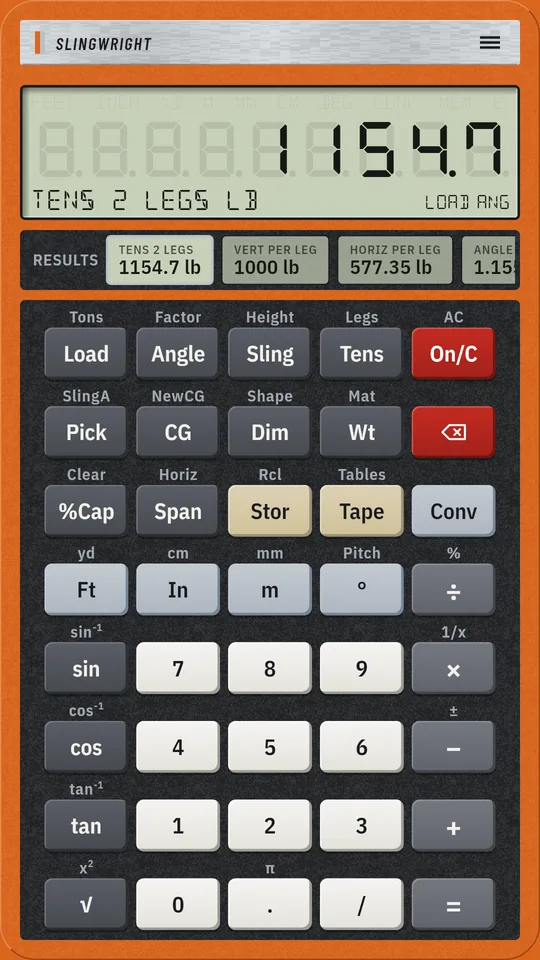
What it does
Slingwright is a rigging calculator for riggers, signal persons, crane crews, lift planners and students. It works like a hardware calculator: a safety-orange chassis, real keys and a clear LCD, with each answer labelled so you know what you are reading.
Sling angles
- Sling angle from horizontal, typed or solved from any two of sling length, hook height and span
- Angle factor 1 ÷ sin(angle)
- Angles under 30° are flagged LOW ANG, as ASME B30.9 discourages them
Leg tension
- Tension per leg for 1 to 4 legs, with the vertical and horizontal force per leg
- For 3 or 4 legs only 2 are assumed to carry the load
- Horizontal force per leg: the compression in a spreader beam
Offset centre of gravity
- Two-leg bridle: the load share at each pick point
- With the hook height set, each leg's tension, angle and length for a level lift with the hook over the centre of gravity
- Centre of gravity of several items along a line, with the total stored as the load
Load weight
- Estimated weight of a box or plate, round bar or pipe in steel, stainless, cast iron, aluminium, copper, concrete, water or wood
- Pounds and US tons, or kilograms and tonnes
Percent of capacity
- Type the rated capacity from the equipment tag or load chart and see the load and the leg tension as a percentage of it
- Slingwright holds no sling, hardware or crane capacities: you enter them
Works the way you do
- Feet and inches or metres
- A results strip shows every solved value at once
- 10 memories, a tape of your calculations, reference tables (angle factors, material densities) and a key guide
Worked examples
- Leg tension. 2000 lb on two legs at 60° -> 1154.7 lb per leg.
- Offset cg. 10000 lb, hook 8 ft up, CG 4 ft from A and 6 ft from B -> share A 6000 lb.
- Sling angle. 10 ft slings, hook 8 ft above the pick points -> sling angle 53.13°.
- Load weight. Steel plate 96 x 48 x 1 in -> estimated weight 1306.67 lb.
- Percent capacity. 2000 lb at 60° against a 2000 lb rated capacity -> load 100 % of capacity.
- Metric tension. 1000 kg, 4 m slings, hook 2 m up -> 1000 kg per leg at 30°.
How it's calculated
Every trade key and the formula behind it, as shown in the app's key guide. A second legend is the shifted function.
- Load TonsLoad weight / Load weight in tons
- Stores the typed load weight, pounds or kilograms by the unit setting; nothing typed recalls it. Shifted works in US tons of 2000 lb, or metric tonnes.
- Angle FactorSling angle from horizontal / Sling angle factor
- Stores the typed sling angle, in degrees from horizontal; nothing typed solves it, e.g. asin(height ÷ sling). The last two typed of sling, height, span and angle set the geometry. Angles under 30° are flagged LOW ANG (ASME B30.9 discourages them). Shifted shows the angle factor 1 ÷ sin(angle).
- Sling HeightSling length / Height from hook to pick points
- Stores the typed sling leg length, hook to pick point (plain numbers are feet or metres); nothing typed recalls or solves it. Shifted does the same for the vertical height from the hook down to the pick points.
- Tens LegsSling leg tension / Number of legs
- Leg tension = load ÷ legs ÷ sin(angle), then vertical and horizontal force per leg and the angle factor. For 3 or 4 legs only 2 are assumed to carry the load. Shifted stores the leg count, 1 to 4 (2 by default).$_planning
- Pick SlingAPick points / Sling A length
- Type the horizontal distance from the centre of gravity to pick point A, then to B, pressing Pick after each; then gives each point's share W × other distance ÷ span and, with the hook height set, each leg’s tension, angle and length for a level lift with the hook over the centre of gravity. Shifted turns a typed sling A length into the hook height.$_planning
- CG NewCGCentre of gravity / Start a new centre of gravity
- For each item type its weight and press CG, then its position from a datum with a length key and press CG: shows the centre of gravity Σ(W × x) ÷ ΣW and stores the total as the load. Nothing typed steps through CG, total and item count. Shifted starts over.
- Dim ShapeShape dimension / Load shape
- Type each dimension of the shape, pressing Dim after each (plain numbers are inches or millimetres): box L, W, H; round bar diameter, length; pipe OD, wall, length. Shifted steps through the shapes.
- Wt MatEstimated weight / Material
- Estimates the load weight = volume × density from the shape and material and stores it as the load; press again for the volume and density. A typed volume (cubic feet or metres) is used directly. Shifted steps through the materials. Nominal densities: use the actual weight when it is known.
- %Cap ClearPercent of rated capacity / Clear rigging registers
- Stores the rated capacity typed from the equipment tag or chart; nothing typed shows the load and the leg tension as a percentage of it. Shifted clears every rigging register.$_planning
- Span HorizSpan between pick points / Horizontal force per leg
- Stores the typed horizontal distance between two equal legs’ pick points; nothing typed recalls or solves it. Shifted shows the horizontal force per leg, tension × cos(angle): the compression in a spreader beam.$_planning
FOR LIFT PLANNING ONLY. Slingwright computes geometry and statics; it is not certified and does not replace a lift plan. Check every result against the rated capacities on the equipment tags and load charts, and have a qualified person review the lift. Weights from shapes use nominal densities: use the actual weight when it is known. The developer accepts no liability for loss, damage or injury arising from use.
Get Slingwright
Free to try for 7 days, then unlock Pro once. No subscription. Works offline, no ads, no account.
Coming soon to Google PlayIn het Nederlands
Strophoek, kracht per part, lastverdeling en zwaartepunt voor hijsplanning.
Slingwright is een hijsrekenmachine voor aanslagers, seingevers, kraanploegen, hijsplanners en studenten. Hij werkt als een echte rekenmachine: een signaaloranje behuizing, echte toetsen en een helder LCD-scherm, met bij elk antwoord een label zodat u weet wat u leest.
Gratis 7 dagen proberen, daarna eenmalig Pro ontgrendelen. Geen abonnement.